Avoid using setTimeout(fn, 0) for breaking tasks on main thread
setTimeout(fn, 0) for breaking tasks on main thread is a common pattern in web development, but it has several flaws and could be the cause of bugs and race conditions when your app runs.
setTimeout(..., 0) pattern has been used by developers to break up potential long tasks on the main thread. The intent is clear: "pause execution, let the browser render any pending updates, and then resume my logic immediately."
However, this pattern has several flaws and could be the cause of bugs and race conditions when your app runs.
The browser's main thread is single-threaded, and this single thread is used to orchestrate many the complex tasks that today's web apps include - parsing HTML, constructing the Document Object Model (DOM), executing JavaScript logic, calculating CSS styles, etc.
To allow for all these tasks to be done in time - and not block the main thread, the technique to split up tasks manually using setTimeout(..., 0) has been popular, but what flaws does it cause?
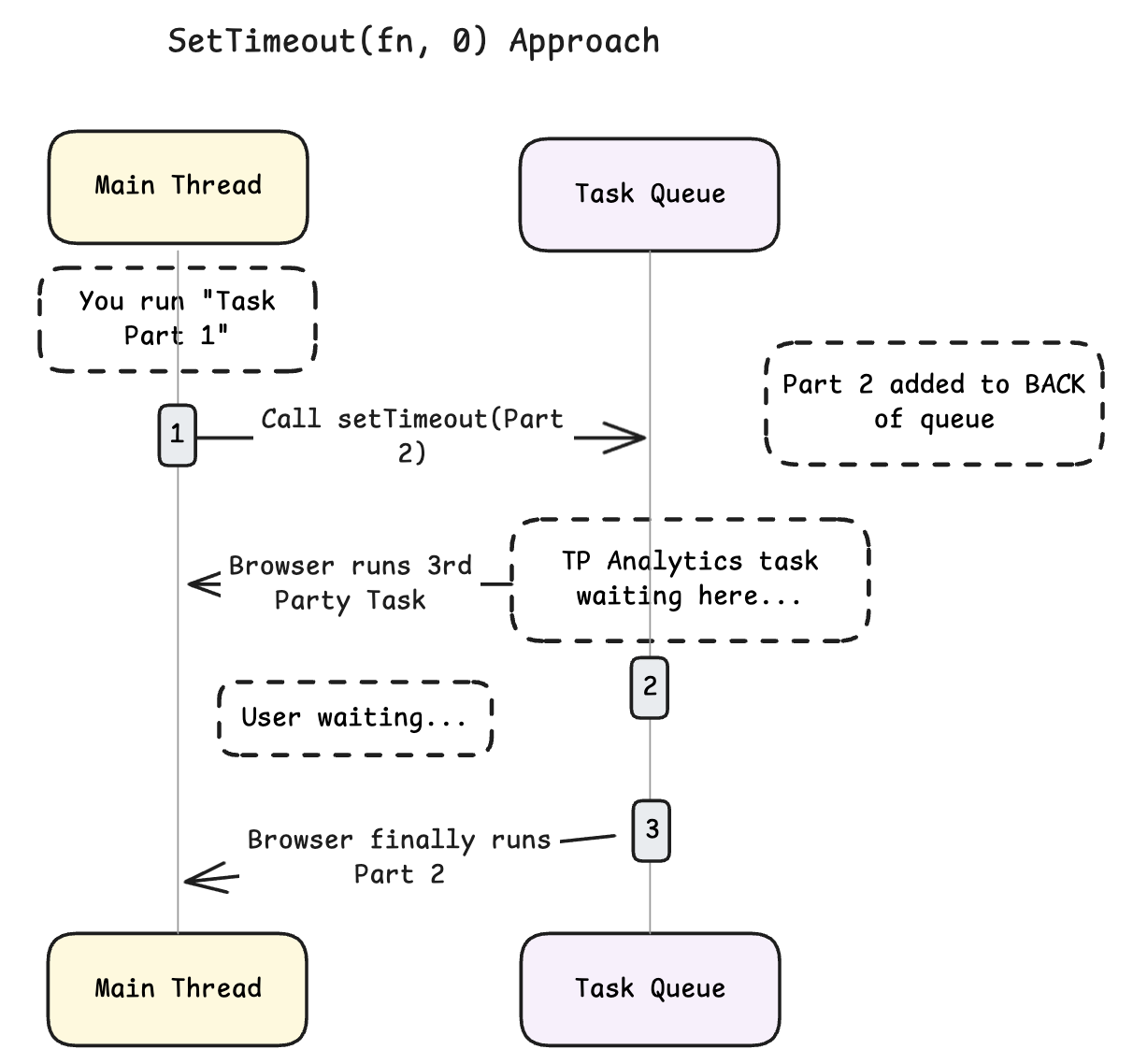
The First-In-First-Out (FIFO) Trap - Using setTimeout for task fragmentation is the First-In-First-Out (FIFO) nature of the macrotask queue. When you execute setTimeout(fn, 0), you are not pausing the current task in place; you end up scheduling a completely new task to be appended to the end of the browser's timer task queue. This means your task will now be executed until the browser processes all the tasks in the task queue.
Example; A critical First-Party task is running - there's calls something like setTimeout(ContinueHydration, 0) to break some hydration work. Now, in between this work, a Facebook Pixel, a Google analytics and some other third party script have queued up tasks. The ContinueHydration task will be pushed at the end of the queue, behind all the third-party noise. The "yield" becomes a "surrender."
The 0ms lie - From the syntax it seems like the executes the code immediately, but browsers impose strict minimum delays called "clamping." If a loop that yields recursively more than five times a minimum delay of 4 milliseconds for each subsequent call will be added by the browser. And if a user switches tab - modern browsers aggressively up this throttle time to save battery and CPU cycles. So if you use setTimeout to yield some task and a user switches tab - the task can effectively freeze or heavily delayed by the browser.
And, If setTimeout takes 4ms to fire, but the browser only needed 0.5ms to process pending input events and render a frame, the remaining 3.5ms is wasted idle time. During this time window, the main thread is doing nothing, effectively wasting 3.5ms (which may not sound like a lot, but in performance every ms counts)
Now imagine this scenario - In an e-commerce site a user clicks "Add to cart", you run a complex handler and anticipate 100ms worth of work, you yield at 50ms using setTimeout, now because e-commerce sites use lots of third-parties and tracking scripts this action also triggered event listeners from Pixels and Analytics scripts, now because of the setTimeout the task has been appended at the end of the queue - the browser sees the third party tasks waiting in the same queue before this, and ends up running this analytics code before the "part 2" of the handler that was yielded. If the analytics tasks take 200ms (a not so uncommon number for these scripts), the user gets a 250ms+ delay in the UI update.
So now to the fun part - what should you be using instead? Enters development of the Prioritized Task Scheduling API. This API introduced two primary methods scheduler.postTask and scheduler.yield.
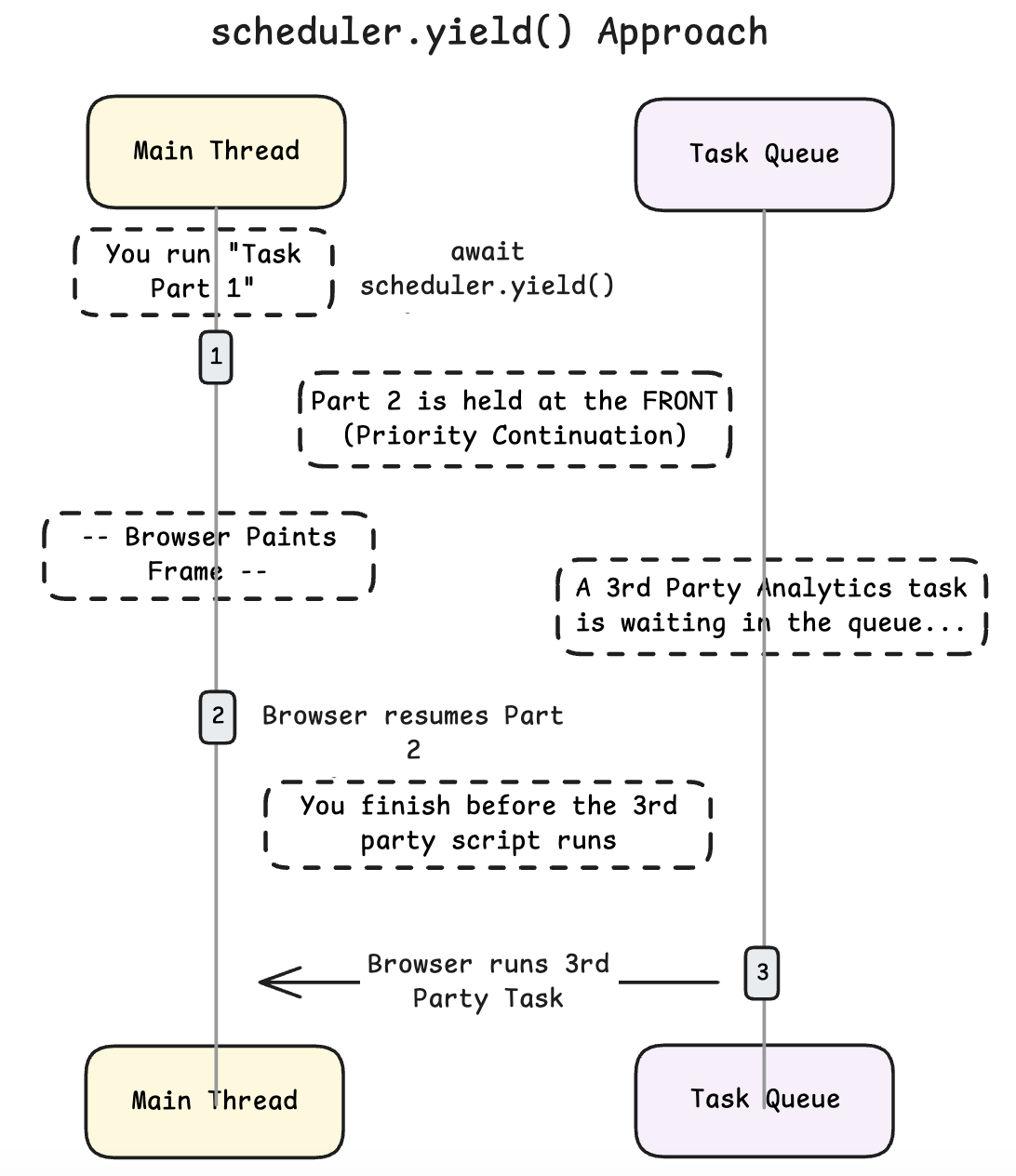
I'll talk about scheduler.yield() because that's the one used for solving the breaking up continuation work. When a function awaits scheduler.yield(), it yields control to the main thread. The most important change here is - when the main thread finishes handling the high-priority interrupt (like a user click or a paint), it returns to the continuation of the yielded function before processing other tasks in the queue. Effectively pushing our task to the "front-of-the-queue"
Scenario A: The Traditional setTimeout Approach
- Task Start:
ProcessData (Part 1)runs (Triggered by user click). - Yield: Developer calls
setTimeout(Part2, 0). - Queue State: The queue contains ``. (Part 2 is appended to the end).
- Interference: The browser executes
ThirdPartyAnalytics(which takes 50ms). - Resumption: Finally,
Part2runs.- Result: A 50ms delay is inserted into the user's interaction. The user perceives lag.
Scenario B: The scheduler.yield() Approach
- Task Start:
ProcessData (Part 1)runs (Triggered by user click). - Yield: Developer calls
await scheduler.yield(). - Queue State: The browser conceptually places the continuation of
ProcessDataat the front of the queue, or in a special "continuation" slot. ``. - Interference Check: The browser checks for ultra-high priority work (input, painting). It paints the frame.
- Resumption: The browser immediately executes Part2.
- Deference: ThirdPartyAnalytics runs after Part2 completes.
- Result: The user interaction completes with zero interference from the analytics script. The analytics script waits, which is acceptable for analytics.
However, the scheduler.yield is a relatively new API and is currently only supported in chromium browsers (though Firefox has support in nightly builds).
So a pattern to follow to do scheduling is to follow this chain: scheduler.yield -> scheduler.postTask -> MessageChannel -> setTimeout.
/**
 * Yields back to the browser so it can handle input/rendering,
 * resuming with prioritized continuation where supported.
 */
async function yieldToMain() {
  // 1. Native Prioritized Continuation (Best)
  // Chrome 129+, Edge 129+, Firefox 142+.
  // This yields and resumes the same task with proper priority.
  if ('scheduler' in globalThis && 'yield' in globalThis.scheduler) {
    return globalThis.scheduler.yield();
  }

  // 2. Native Prioritized Scheduling (Better)
  // Schedules a 'user-visible' task to avoid being treated as background work.
  // This avoids the 4ms nested-timer clamp that affects setTimeout.
  if ('scheduler' in globalThis && 'postTask' in globalThis.scheduler) {
    return globalThis.scheduler.postTask(() => {}, { priority: 'user-visible' });
  }

  // 3. Universal Fallback: setTimeout(0)
  // MessageChannel can sometimes be snappier, but adds boilerplate.
  // This is the simplest reliable cross-browser fallback.
  return new Promise(resolve => setTimeout(resolve, 0));
}
Some sources:
- The 4ms clamping defined in HTML standard for setTimeout - https://html.spec.whatwg.org/multipage/timers-and-user-prompts.html
- Freezing timers to save energy - https://developer.chrome.com/blog/freezing-on-energy-saver
- scheduler.yield() - https://developer.chrome.com/blog/introducing-scheduler-yield-origin-trial
- Defer code execution - https://web.dev/articles/optimize-long-tasks#defer-code-execution